Residential Compound Management System
Everything in one place
Accounting, instalments, services, security, a website and an owner portal — in one system that works in Arabic and English.
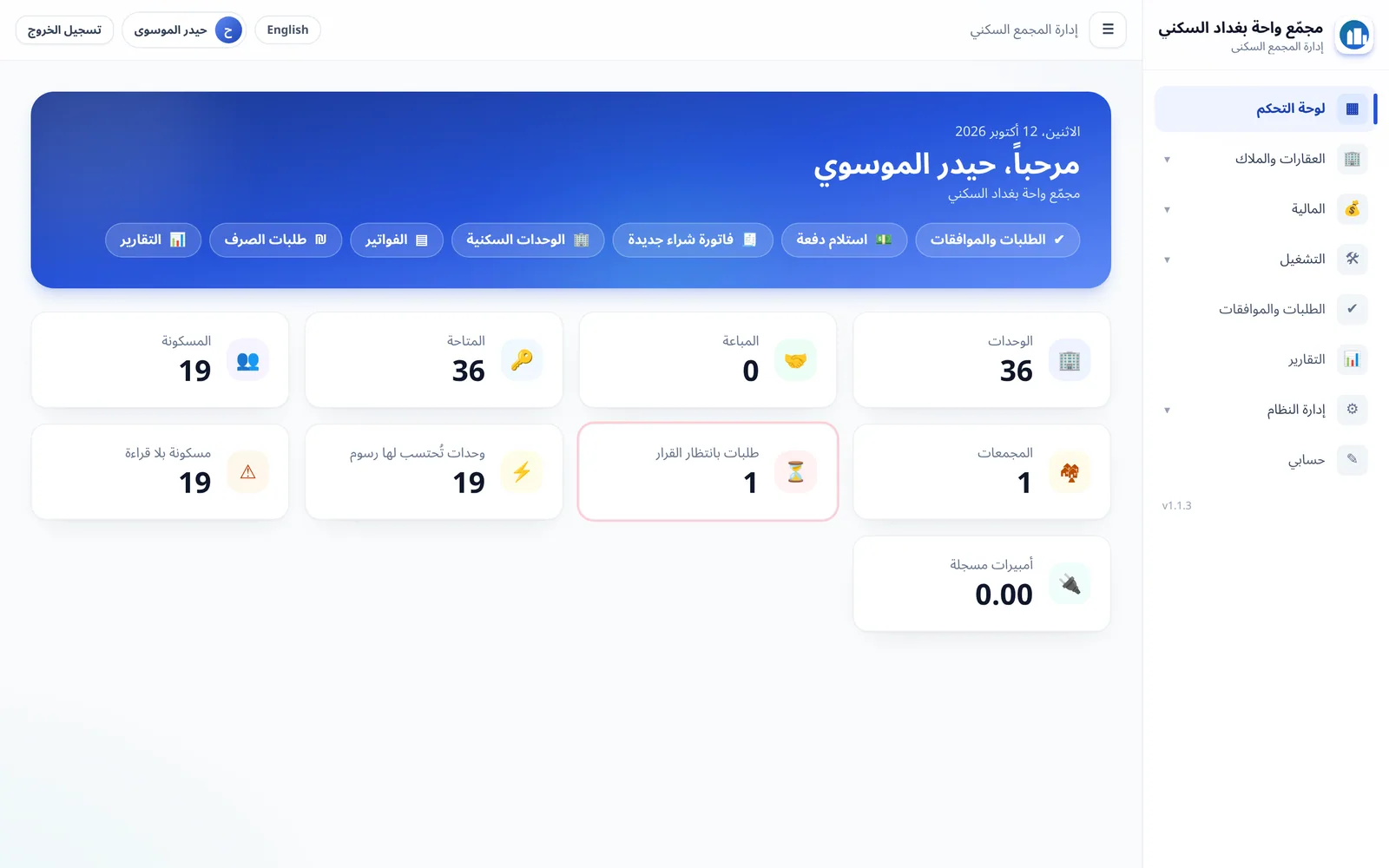
The system brings the whole management of a residential compound into one place: units and owners, double-entry accounting, instalments, services and generator fees, security and visitors with QR codes, an owner portal, and a website for the compound or its properties. The modules talk to each other: when an invoice is issued the owner sees it, and when a unit’s fees are suspended the guard knows — with no data moved between separate programs.
Who is this system for?
- Residential compounds and property management offices
- Real-estate brokers
- Accounts managers, cashiers, engineers and service staff
- Owners and security guards (through their own portals)
The problem it solves
What goes wrong when a compound is managed the traditional way?
No permissions and no audit trail
You cannot tell who changed what, who looked at an owner’s data, or what happened in an account.
Lost instalments and arrears
There is no clear follow-up, and owners ask every day: how much do I owe and when is the next instalment?
Ledgers, spreadsheets and chat apps
Invoices and vouchers are scattered, every employee keeps their own copy, and there is no single reference to rely on.
How it works
Eight modules working together
Units and owners
A file and timeline for every unit.
Accounts and invoices
Double entry and reports.
Instalments
A plan from any invoice.
Services and generator
Monthly fees and amperes.
Security and visitors
QR permits and a log.
Owner portal
Their account from their phone.
Website
Pages, properties and news.
Maintenance and engineering
Requests and construction stages.
Access
- CaddyAutomatic HTTPS when a domain is set
Application
- Next.jsWeb
- NestJSAPI
- WorkerMonthly fees and WhatsApp
Data
- PostgreSQL
- Redis
Protection
- BackupDaily encrypted backup
Features
Units, owners and operations
From the project documentation.
A complete property hierarchy
Projects, then compounds (compound, apartment blocks or horizontal housing), then buildings, floors and units, with a file and a timeline for each unit.
Engineering, disbursement requests and maintenance
Construction stages and progress, disbursement requests with documents, and maintenance requests from owner to engineer to the services department.
Purchasing and suppliers
Purchase invoices, supplier statements and bank accounts.
Accounting and reports
Double-entry accounting
No entry can be edited after posting, and figures come from the entries themselves, so reports always match reality.
PDF invoices, receipts and vouchers
With your letterhead and logo, plus a dedicated cash box for each cashier.
Ready-made reports
Debt ageing, balance sheet, revenue and instalment status, and every report exports to print or to a CSV file for Excel.
Instalments
Split any invoice into instalments
Choose the number of months and the start date and the schedule appears ready, with automatic rounding to the smallest banknote and the difference recorded clearly.
A status for every instalment
Due, overdue, partially paid or fully paid.
Postponement and reminders
Postpone an instalment and change its date with a clear record, plus a WhatsApp reminder before it is due.
Services and generator
Monthly fees without the effort
Fees are calculated for every occupied unit and their invoices are issued with one click.
Generator billing
An ampere price per month and bulk unit readings.
Fee suspension with a recorded decision
The services department marks a unit as unoccupied and the accounts manager decides; a suspension with a written reason is visible to the guard and the owner.
Owner portal
Owners see their account on their phone
The balance, arrears and next instalment on the first screen, with the statement and invoices as PDFs.
Construction stages and progress
With photos from the site.
Maintenance requests with photos
And follow its status until completion.
Sees their own units only
No access to other people’s data.
Security and visitors
Visitor permits with a QR code
The owner issues it with a validity period and the guard scans it with their phone camera to log entry or exit.
A code works only for the allowed number of uses
Every refusal is logged with its reason, with a complete record of every entry and exit.
Paperless guards, no financial data
Suspended accounts appear with the reason, and no financial data of the owner is shown.
Website and real-estate brokers
A ready website for your compound or properties
Pages, news and properties with photos, with the price shown or hidden, each page in a style you choose and several sections you add and order.
Visitor enquiries inside the system
Messages from the website contact form arrive in the system and each is marked “handled”, with call and WhatsApp buttons on mobile.
Reservation and sale with approvals
A reservation or sale request goes through a responsible person’s decision, so a property is never booked twice and every step is recorded. Status: available, reserved or sold.
Control and security
Ten ready-made roles you can adjust
Accounts manager, cashier, engineer, security and more, with scoped permissions: the whole company, one project or one specific compound. Permissions are enforced on the server, not just by hiding buttons.
A permanent audit log
Who did what and when, with an “oversight” role that can view only, without creating or editing.
Daily encrypted backups and two-step login
The system administrator does not touch financial figures; financial decisions belong to the accounts manager.
Languages, notifications and getting started
Arabic and English in one click
Screens, reports, documents and invoices are all produced in both languages, and each user chooses their own.
WhatsApp works for you
The owner-portal activation link, instalment due alerts, payment decisions and a security notice when a unit’s fees are suspended, with a message centre showing each message’s status and letting the owner stop notifications.
Excel import with a preview
Import units, owners and ownership, and see a preview before committing; the import never modifies existing data and the whole file is rejected on error instead of half-loading.
One-command install on your own server
Your data stays with you.
Screenshots
From the real interface of the system, with sample data.
Dashboard: the state of the compound at a glance
Debt ageing report
An instalment plan created from an invoice
Services and generator
The compound website on desktop
The interface in English (left to right)
Roles and permissions
Importing from Excel
Owner portal: home
Owner portal: financial account
Security portal: scanning a visitor code
The website on mobile
All screenshots on this site come from the real interfaces of the systems and show sample data, not client data.
Benefits for you
Owners follow their own accounts
Instead of calling the office every day, owners see their balance, arrears and next instalment on their phone.
One reference and a full audit
Double entry and a permanent audit log instead of scattered ledgers and files.
Clearer collection
Instalments with a status for each one and WhatsApp reminders before they fall due.
Everyone sees only what concerns them
Scoped permissions enforced on the server.
Usage scenarios
Splitting an invoice into instalments
The employee picks the invoice, the number of months and the start date; the system calculates the instalment, rounds it to the smallest banknote and records the difference, and the schedule appears to the owner in their portal.
A visitor arrives at a unit
The owner issues a QR permit with a validity period, the guard scans it with their phone and logs the entry, and the movement stays on record.
An unoccupied unit
The services department marks the unit as unoccupied, the accounts manager decides to suspend the fees with a written reason, and the reason is shown to the guard and the owner.
A property enquiry
A visitor sends an enquiry from the website form, it arrives inside the system and you mark it “handled” after replying.
Technology, requirements and integrations
Technology
- Next.jsWeb interface
- NestJSAPI
- PostgreSQLDatabase
- RedisCache and queues
- CaddyReverse proxy and HTTPS
- DockerPackaging and installation
Requirements
- A server running Docker. A one-command installer is provided for Windows, Linux and macOS.
- A public domain name for automatic HTTPS, or run on a local address.
- The WhatsApp service needs internet access and roughly 300–600 MB of extra memory.
- Keep the backup passphrase outside the server — without it backups cannot be restored.
Integrations
- WhatsApp: link the company number by scanning a QR code once (a dedicated number for notifications is recommended)
- Excel: import units, owners and ownership, and export reports as CSV
- PDF: invoices, receipts, vouchers and statements in Arabic and English
Frequently asked questions
Does the system work in Arabic and English?
Yes. The interface, reports, documents and invoices are produced in Arabic (right to left) or English, and every user picks their language.
Where is the data stored?
The system is installed with one command on your own server and your data stays with you, with a daily encrypted backup.
How do I move my existing data?
You import units and owners from an Excel (xlsx) file and see a preview before approving. The import never changes anything that exists and rejects the whole file if there is an error.
Can an owner see other people’s data?
No. An owner sees only their own units, and the guard sees no financial data.
How does visitor access work?
The owner issues a QR permit with a validity period and the guard scans it with their phone camera. The code can only be used the allowed number of times and every refusal is logged with its reason.
Can I try the system?
Yes. We offer a live demo with sample data of about half an hour, prepare a trial copy with your company name and logo, and train your team according to their roles.
Request a demo or information
Tell us what you need and we will get back to you.