ISP Manager
A complete management system for internet service providers
Authentication, subscriptions, invoices, cards, network monitoring and WhatsApp notifications — all in one dashboard.
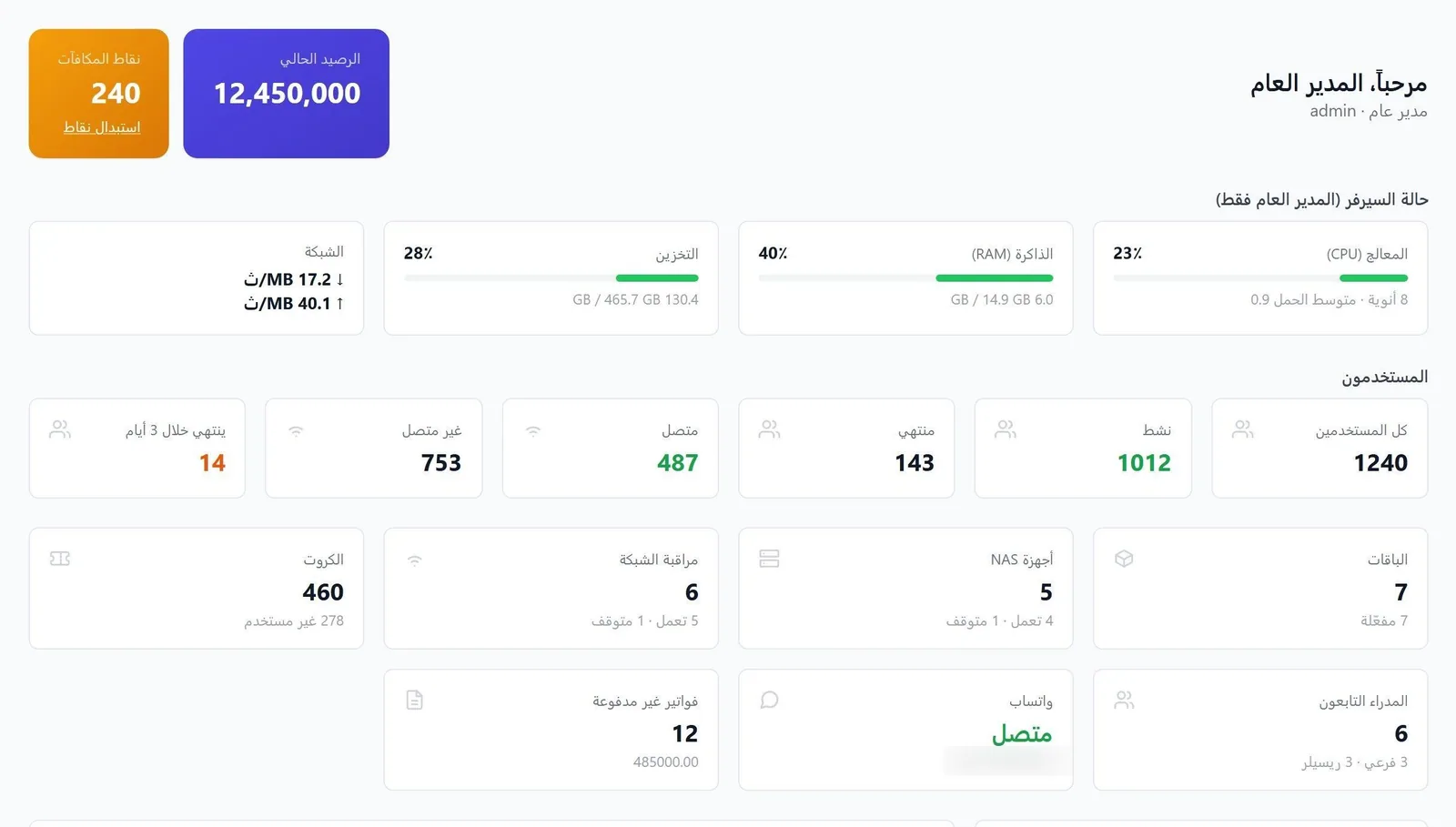
ISP Manager is an Arabic platform that covers the whole subscriber lifecycle in a single dashboard: registration, activation, RADIUS connection on your own devices, monitoring and collection. Instead of switching between separate tools, you manage subscriptions, packages, cards, invoices, live sessions, network devices and WhatsApp notifications from one place.
Who is this system for?
- Internet service providers (ISPs)
- Small and medium networks
- Managers, branches and agents who sell subscriptions and cards
- Technical support and accounting teams
The problem it solves
Running an ISP usually means scattered tools and manual work
Limited visibility
Who is online right now? Which device went down? Whose subscription expired? There is no instant answer.
Work on every device
Disconnecting a subscriber, freezing them or changing their package means logging in to the router itself.
Manual accounting
Invoices, balances and renewals are kept in separate sheets, so they arrive late and contain mistakes.
How it works
One platform for the whole subscriber lifecycle
Register
Add the subscriber or import from Excel.
Activate
Assign a package and set the expiry date.
Connect
Authentication and accounting through RADIUS on your devices.
Monitor
Live sessions with instant disconnect and freeze.
Collect
Invoices, balances and WhatsApp alerts.
Access devices (NAS)
- MikroTik
- Cisco
- UBNT
- Mimosa
Authentication and accounting
- FreeRADIUS 3rlm_sql on the same database
Data
- PostgreSQL 16Row-level isolation
Backend
- NestJSAPI
- WhatsApp workerOne isolated session per manager
Frontend
- ReactArabic RTL and English, dark mode, installable
Features
Subscribers and automation
One-click subscriber management
Activate, renew, freeze and disconnect — every action from the subscriber row itself.
Fast search and filtering
By status, package, owner and connection state.
Excel import and export
Move your existing subscriber base in a single batch.
Expiry handled automatically
Edit the expiry date and the status and connection group update with no extra step; the session is dropped immediately on freeze or expiry.
Periodic check every 10 minutes
Expired subscriptions are moved to a restricted end-of-subscription group, or rejected, depending on each package setting.
Sessions, devices and monitoring
Live sessions under control
Disconnect one specific session without touching the subscriber’s other sessions, ping each session, and stale sessions close automatically.
All your network devices in one place
MikroTik, Cisco, UBNT and Mimosa: add a NAS or a monitoring device in a few simple steps.
Status monitoring and outage alerts
See which devices are up or down, the last check time and the number of connected users per device, with a WhatsApp message when a device stops and when it returns.
A live dashboard
Who is online now, subscriptions expiring within 3 days, server status (CPU, memory, storage, network) and unpaid invoices.
Packages and cards
Flexible packages
Supports PPPoE, Hotspot and WPA-Enterprise, with duration in days or in real calendar months.
Wholesale price per manager
Share a package with managers at a separate price for each of them.
Hotspot cards with your own design
Your logo and company name, a QR code for login, an option to make the username the password, and a print-ready PDF.
Batch generation in one click
Up to 1000 cards per batch, per-batch tracking, and the cost is deducted from the manager’s balance at the wholesale price when printing.
Managers, permissions and finance
Multi-level managers and agents
A tree structure — general manager, branches, agents — where each party sees only their own data and their descendants’, with a balance, points and a subscriber limit per manager.
Custom roles with fine-grained permissions
Menu sections and actions are all configurable; one role can be assigned to several managers and shared with other managers.
Money under control
Automatic balance deduction when a package is activated or cards are printed, paid and unpaid invoices with one-click payment marking, and financial entries that cannot be edited once recorded.
WhatsApp and notifications
Automatic WhatsApp alerts
A message on activation, a reminder before expiry with the number of days you choose, and a separate number for each manager with a log of every message and its status.
Customisable messages
Write your own text with variables such as subscriber name, package and expiry date, or leave it empty to use a ready default. Settings are independent for each manager.
Operations and security
Reliable, monitored operation
Live service status (database, server, RADIUS, WhatsApp, interface), a full backup you can download any time, and one-click maintenance: restart services and clean stuck sessions.
Encrypted device credentials
Device passwords and RADIUS secrets are stored encrypted inside the system.
Data isolation and audit log
Each manager sees only their own data and their descendants’, enforced at database level; every sensitive action is logged with who did it and when, over HTTPS with an automatically renewed certificate.
Screenshots
From the real interface of the system, with sample data.
Dashboard: subscriber counts and server status
Subscribers: every action from the subscriber row
Live sessions: disconnect a specific session and measure response time
Packages: speed, duration, activation price and sale price
Hotspot card: username, password and QR code
The same card designer in different colours
A third card design
Cards: batch generation and per-batch tracking
Network devices: status and connected users per device
Managers: branches and agents, each with a balance and points
Custom roles: fine-grained permissions per role
Invoices: paid and unpaid, with one-click payment marking
WhatsApp: connection status and message log
Notifications: customisable messages with variables
Maintenance: service status, restart and clean-up
All screenshots on this site come from the real interfaces of the systems and show sample data, not client data.
Benefits for you
Instant visibility
Know who is online, which device is down and whose subscription ends soon.
Act from one place
Freeze, disconnect or change a package without logging in to each router.
Disciplined accounting
Invoices, balances and renewals in one financial record instead of separate sheets.
Automated subscription lifecycle
Expiry, reminders and disconnection happen automatically.
Usage scenarios
A subscriber’s plan expires
The subscriber receives a WhatsApp reminder the number of days you set before expiry. After expiry the system checks every 10 minutes and moves the expired subscription to a restricted end-of-subscription group, or rejects it, according to its package setting.
Printing cards for an agent
The manager picks the package, quantity and username length; the system generates the batch, deducts its cost from the manager’s balance at the wholesale price, and you download a print-ready PDF in your company design.
A network device goes down
Monitoring detects that the device is not responding and you receive a WhatsApp message, then another when it returns; its status and last check time stay visible on the devices page.
Technology, requirements and integrations
Technology
- NestJSServer and API
- PostgreSQL 16Database
- FreeRADIUS 3Authentication and accounting
- ReactUser interface
- WhatsAppOne isolated session per manager
- DockerDeployment and operation
Requirements
- A server running Docker and Docker Compose (the system is deployed with Docker).
- Access devices (NAS) that connect to the system over RADIUS for authentication and accounting.
- A WhatsApp number for each manager who wants to send notifications.
- Hardware sizing for your network size is agreed when you enquire.
Integrations
- FreeRADIUS for authentication and accounting (PPPoE, Hotspot, WPA-Enterprise)
- MikroTik, Cisco, UBNT and Mimosa devices
- WhatsApp for subscriber notifications and device alerts
- Excel for importing and exporting subscribers
Frequently asked questions
Which service types do packages support?
Packages support PPPoE, Hotspot and WPA-Enterprise, with duration in days or in real calendar months.
Can I move my existing subscribers into the system?
Yes. The system supports Excel import and export, so you can move your current base in one batch.
What happens when a subscription expires?
The system checks subscriptions every 10 minutes and moves expired ones to a restricted end-of-subscription group, or rejects them, depending on each package setting. The session is dropped immediately on freeze, expiry or when the expiry date is edited.
Can an agent see other people’s data?
No. Each manager sees only their own data and their descendants’, and the isolation is enforced at database level.
How do the WhatsApp notifications work?
Each manager links their own number, which is used to send activation messages, expiry reminders and device alerts. Every manager has an isolated session and a log of each message and its status, and message texts are customisable.
Is the interface in Arabic?
The interface is fully Arabic with English support and a dark mode, and it can be installed as an app on a phone.
How can I try the system on my network?
Send us a request through the form below and we will get back to you to arrange a trial on your network.
Request a demo or information
Tell us what you need and we will get back to you.