Opex SmartPromo AI
A WhatsApp promotion and customer-service platform
From the product file to the customer conversation: AI that works within the facts you approved, under your supervision at every step. Version 1.4.9.
Opex SmartPromo AI is a platform that helps companies reach prospects, send organised promotional messages over WhatsApp and answer customers, while a person stays in charge. It starts from your product files: the system extracts facts from them for you to approve, and no fact you have not approved is used in any message. The AI then proposes the audience for you to approve, researches prospects from free sources, you launch a campaign inside a pre-authorised scope, and the assistant handles conversations or suggests replies to your team. Every action is recorded in a log that cannot be edited. It runs on your own server and your data stays with you.
Who is this system for?
- Companies that want to reach prospects and send organised promotional messages over WhatsApp
- Teams that get repeated customer questions and want an assistant that answers from approved information and hands sensitive cases to a person
- Anyone running more than one workspace with plans and limits for each
The problem it solves
Three tiring jobs in WhatsApp promotion
Finding the right customers
Scattered manual searching across sites, maps and social networks takes days, and the results are unordered.
Writing a persuasive and honest message
A generic message is ignored, and one with an inaccurate price or promise harms your reputation and exposes you to accountability.
Answering every customer quickly
Repeated questions all day, and questions the employee cannot answer that get lost among conversations.
How it works
From the product to the reports in six steps
The product
Approved facts.
The audience
The AI proposes it and you approve it.
The research
Prospects from free sources.
The campaign
A first message and organised sending.
The conversation
An automatic reply or one supervised by the team.
The reports
Results, cost and conversion.
Features
From product files to approved facts
Upload your files
PDF, Word, Excel, PowerPoint and scanned images, with Arabic text reading.
Approve the facts
The system extracts prices, offers and features, and no fact is used before you approve it.
Analyse the product
A summary, benefits, the problems it solves and suitable customers, based on the facts alone.
Your company website as a source of answers
The system reads your website so it can answer customers with correct information from it.
Audiences and prospect research
The AI proposes the audience and you approve it
Clear criteria: sectors, cities, company sizes, search keywords and decision makers. Proposed audiences stay “proposed” until you approve them, with no research or sending to an audience you did not approve. Up to ten audiences can be chosen in one campaign.
Automatic research from free sources
Web search through a self-hosted SearXNG with no keys and no per-request cost, reading company sites to take the contact number shown on them, OpenStreetMap, and the public business pages on Facebook, Instagram and LinkedIn through the search engine only: no login and no personal accounts.
Results ranked by fit and ready to contact
A fit score from 0 to 100 with a written reason and a minimum you set; in campaigns only prospects with a valid number are approved, and the number decides the customer’s country. A business that appears in several sources is merged into one record.
Excel import
Add your existing customer lists together with their consents.
Supervised campaigns with safeguards
A campaign inside a pre-authorised scope
An authorisation envelope: sources, countries, a maximum count, a budget and a validity set in advance. The system works inside it alone, and when it is exhausted it stops and waits for your decision, with rounds repeating until the limit is reached or the validity ends.
A first message that explains the whole system
Four to six sentences read in seconds in the customer’s language: a greeting and what the product is and for whom, then a glance at the areas the facts mention, then reasons to choose it from the facts only, then a light invitation without pressure.
The message guard
Any message that carries a price, a discount or urgency you did not approve is held, and you approve each message or approve the campaign and review only the flagged ones.
Instant stop and documented consents
A stop line in every message, and whoever asks for it joins the block list at once; every contact has a recorded basis and consent, and nothing is sent without it.
A natural sending pace
A random interval between messages, a daily cap and sending hours you set, and no person receives more than one promotion for the same product every 24 hours.
Follow the campaign moment by moment
Live counters for recipients, sending, delivery and reading, automatic classification of replies as hot, warm, cold or not interested, an approvals log, and an automatic stop when WhatsApp drops or the limit is reached, with the reason shown.
Conversations run by the assistant or your team
Three modes for each conversation
Automatic, where the assistant answers directly; suggested, where it prepares a reply that your employee sends after review; and manual, handled by your team alone.
Answers from approved sources
Answers from the approved facts, the company site and the team’s earlier answers, and hands the conversation to an employee for a complaint or when a decision is needed.
When the assistant does not know, it asks your team
It does not guess: it puts the question in the team questions list, and once an employee answers one time the reply reaches everyone waiting in their language, and the answer is saved so the assistant can use it for similar questions later.
A request for a meeting or a call
It reaches the team as a notification and a follow-up task, the customer receives one fixed sentence saying the request is with the team and they will be in touch, and the assistant keeps answering the customer’s other questions.
Understands voice messages
The system turns the recording into text with a voice engine you choose and then treats it like any written message; your employee can play the original recording, and when unsure a person is asked instead of guessing. No audio is sent to an outside provider before the voice engine is switched on.
One number for promotion and customer service
Linking by scanning a QR code with no programming and no keys, a daily cap and an interval between messages, a reply style (sales or customer service), and an interface that adapts to mobile.
Reports and control
Reports that measure results
Sending, delivery, reading, replies and an interest rate, a conversion funnel from the message to the deal, the AI cost per campaign and per engine, and a CSV export.
Fine-grained permissions
Ready-made and custom roles and a permission for every feature, and a role cannot grant what its creator does not hold.
An event log that cannot be edited
Who did what and when: campaigns, approvals and settings.
Isolation between workspaces
Isolation at database level, not just a filter in the interface, and the platform administrator manages plans and limits but cannot see the content of conversations and customers.
Choose the AI model for each task
OpenAI, Anthropic, Gemini, DeepSeek, Mistral, xAI, Qwen, OpenRouter, any OpenAI-compatible service, or a local model. One engine for research, one for conversations, one for embedding and one for voice, with an optional fallback model and a monthly cap per engine.
Encrypted keys
AI provider keys are stored with AES-256-GCM encryption and are never returned by the system.
Running on your server
Docker on Ubuntu
Your database and files are with you, with automatic HTTPS through Caddy.
A documented backup
A daily backup, a restore test before every update, and one command to rotate the encryption key.
Plans and limits
Each workspace has limits on members, WhatsApp accounts, tokens and messages.
Automated tests before every release
539 automated tests run before every release.
Screenshots
From the real interface of the system, with sample data.
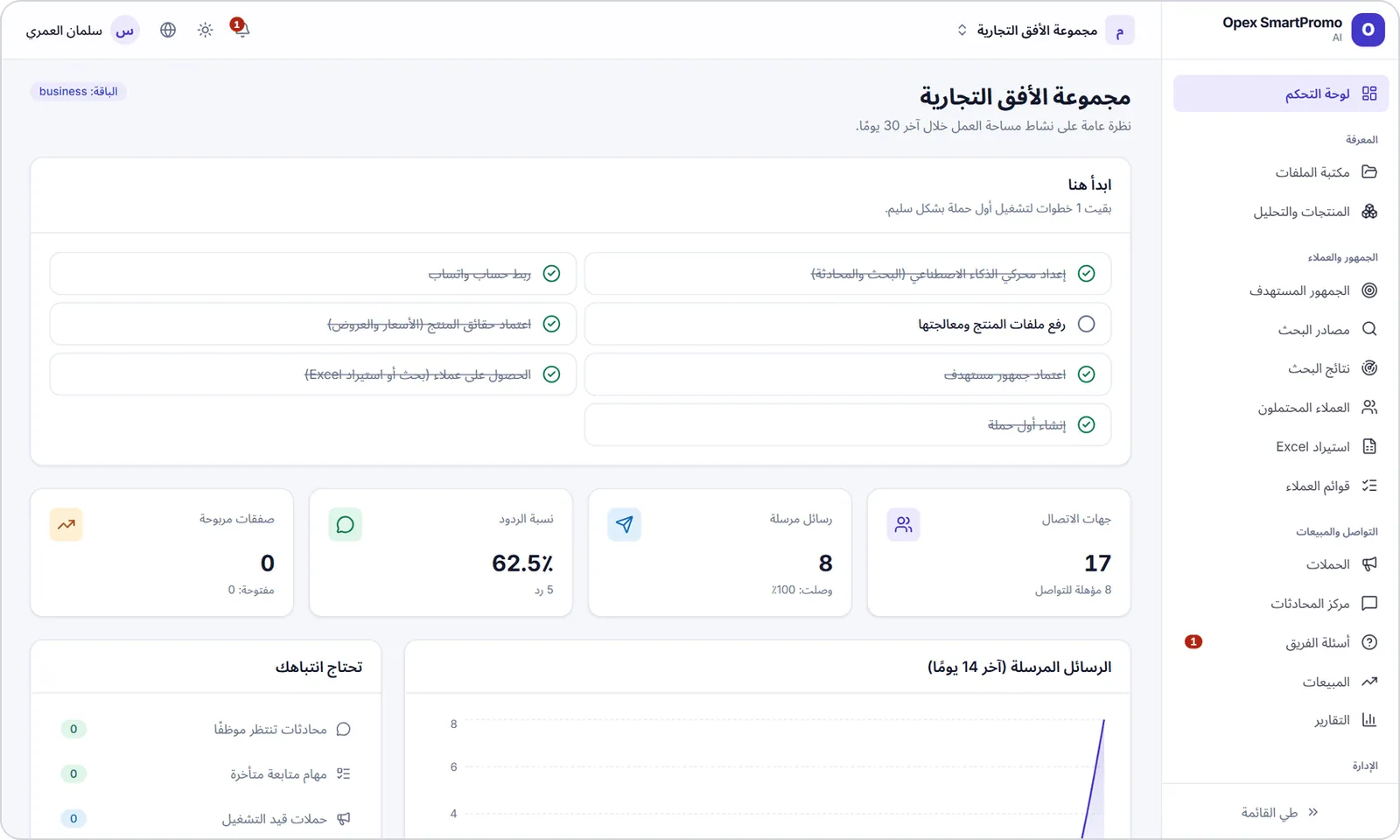
The dashboard: getting-started steps and workspace indicators.
The product page and the analysis report built on approved facts.
Target audiences: proposed and approved.
The details of a research run: the sources actually used and the search plan.
Prospects: eligibility, fit, source and status.
The campaign wizard: the authorisation envelope with sources, countries, count and validity.
Campaign details: counters, customer interest and the approvals log.
The conversation centre: a reply suggested by the AI for the employee to review before sending.
Team questions: a question the assistant could not answer.
The WhatsApp link with a plain notice that the link is unofficial.
Reports: campaign indicators and the conversion funnel.
The event log: who did what and when.
The conversation centre on a phone.
All screenshots on this site come from the real interfaces of the systems and show sample data, not client data.
Benefits for you
Honest messages
No price and no promise outside the facts you approved.
Research with no per-request cost
The research sources themselves are free, and only the AI cost is counted.
A person makes the decisions
Approvals, limits, automatic stops and a full log.
Genuinely Arabic
A right-to-left interface and replies in the customer’s dialect.
Freedom to choose the AI
Any provider and model, with an engine and a budget for each task.
Your data stays with you
The database and files are on your server with a daily backup.
Usage scenarios
Start in three steps
You install the system on an Ubuntu server and create the administrator account, then link WhatsApp by scanning a QR code, upload the product files and approve the facts, then approve the audience, set the authorisation envelope, review the messages and start the first campaign.
A customer asks something the assistant does not know
The assistant puts the question in the team questions list and the conversation stays automatic; an employee answers once, the reply reaches the customer in their language and the answer is saved for similar questions.
A customer sends a voice message
The system turns it into text with the voice engine you chose, and the assistant answers from the approved facts or suggests the reply to an employee, who can play the original recording.
A campaign that stops by itself
The campaign stops when WhatsApp drops or the authorised limit is reached and tells you why, so nothing is sent outside your limits.
Technology, requirements and integrations
Technology
- NestJS 11The API and the workers
- Next.js 16 + React 19The web dashboard
- PostgreSQL 16 + pgvectorData and semantic search with row-level isolation
- Redis + BullMQQueues and background jobs
- whatsapp-web.js + ChromiumThe WhatsApp link (unofficial)
- SearXNGA self-hosted search engine
- CaddyAutomatic HTTPS
- Docker ComposeDeployment
Requirements
- An Ubuntu Server 22.04 or 24.04 (x86-64) with Docker Engine and Compose v2.
- 4 GB of RAM at least and 8 recommended, since every linked WhatsApp number runs a Chromium of about 300 to 500 MB.
- 15 GB of free disk space.
- A domain whose A record points at the server, with ports 80 and 443 open inbound.
- A key for the AI provider you choose, and a voice-transcription engine if you want voice messages understood.
Integrations
- WhatsApp through WhatsApp Web (an unofficial link)
- OpenAI, Anthropic, Gemini, DeepSeek, Mistral, xAI, Qwen, OpenRouter, any OpenAI-compatible service, or a local model
- SearXNG, OpenStreetMap, company websites and public business pages
- Excel and CSV import and CSV export for the reports
What you should know, openly
These limits come from the product’s own documentation; we state them so you can decide with open eyes.
The WhatsApp link is unofficial
It works through WhatsApp Web, and WhatsApp may restrict numbers that break its terms. Keep to the consents and the sending pace. The official WhatsApp Business interface is not supported yet.
Free research is uneven
Many businesses publish no number, the public map servers can go down at times, and what to expect from social pages is modest.
AI makes mistakes
Fit scores and replies are estimates that depend on the model you choose, and the texts each request needs are sent to its provider. That is why human review and limits exist.
Voice needs a transcription engine
It sometimes gets dialects, names and numbers wrong, so a person is asked when in doubt.
Frequently asked questions
Is the product available now?
Yes. The current version is 1.4.9 (October 2026), and 539 automated tests run before every release.
Does it send without my approval?
No. There is no research, campaign or message before the person with the authority approves, and a campaign works inside an authorisation envelope you set and stops when it is used up.
Does it invent prices or promises?
No. Prices, offers and promises come only from facts you approved, and any message carrying a price, discount or urgency you did not approve is held.
Does it use the official WhatsApp interface?
No. It works through WhatsApp Web, which is an unofficial link, and WhatsApp may restrict numbers that break its terms. The official WhatsApp Business interface is not supported yet.
Where is my data stored?
On your server: the database and files are with you, with a daily backup. The texts each request needs are sent to the AI provider you choose.
What does it cost to run?
The research sources themselves are free, and only the AI cost is counted and shown in the reports with a monthly cap per engine. As for the price of the system itself, we do not state it on this page, so request an offer through the contact form.
Request a demo or information
Tell us what you need and we will get back to you.